Find any file
by what’s in it.
Describe what you remember, like “the lease that mentions pets” or “photo of a parrot”, and Search Files finds it, even when you’ve forgotten the name. It reads your documents, PDFs, photos and screenshots with Google DeepMind’s EmbeddingGemma 2, right on your Mac.
$40 off for the first 100 · 21 leftOne-time purchase · macOS 26 or later · Works offline
Three steps. Nothing to learn.
Open Search Files from the launcher with ⌃⌥Space, or from the menu bar.
- 1
Choose your folders
Pick Documents, Desktop and Downloads with one click, or any folders you like. The search model is a one-time download, then everything works offline.
- 2
Let it read
Search Files reads every document, PDF page, photo and screenshot in those folders on your Mac, and keeps up as you add, change and delete files.
- 3
Describe what you need
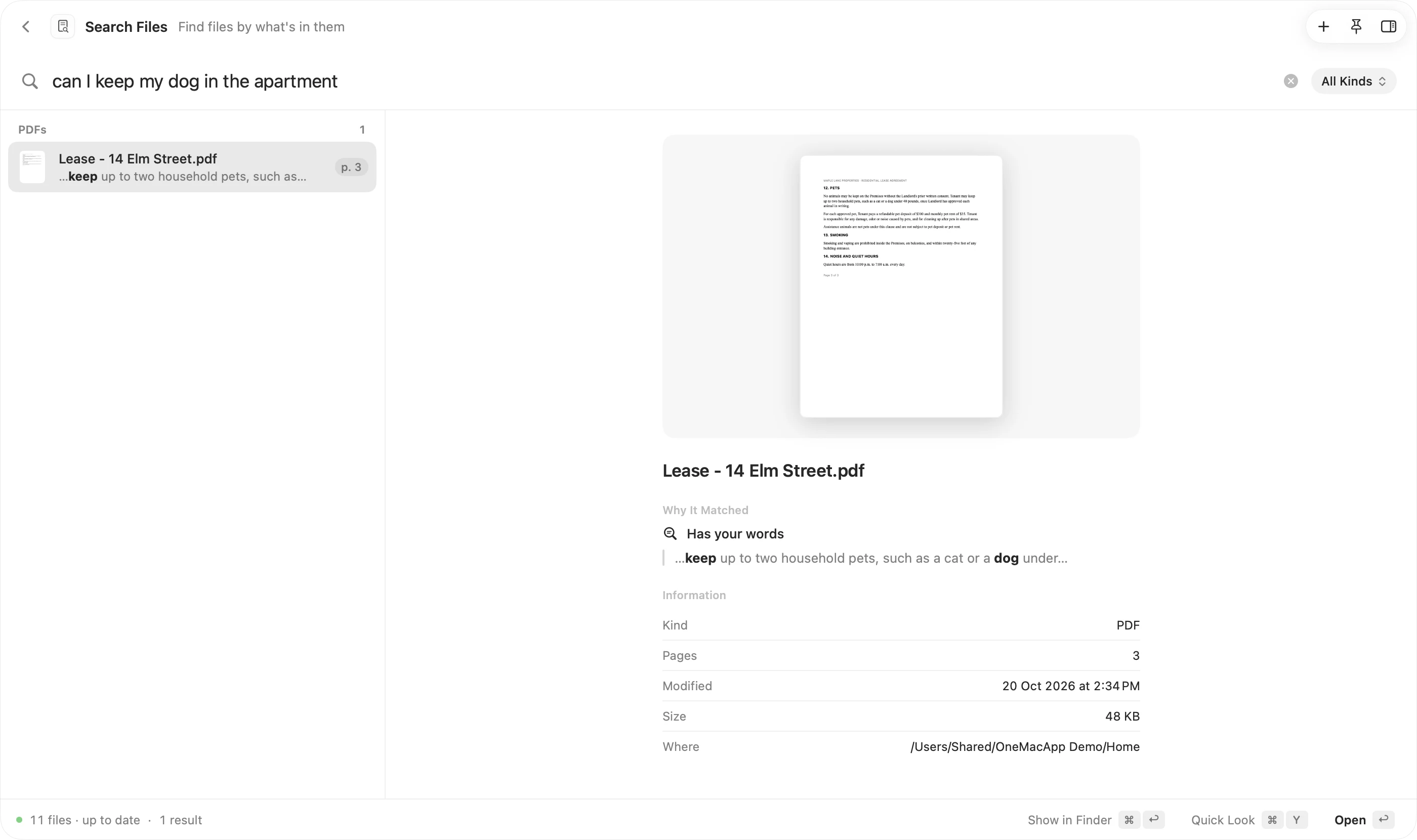
Type it the way you remember it. The best matches show up as you type, with a preview of the page or picture that matched. Press Return to open it.
Everything you’d want. Nothing you wouldn’t.
Search by meaning
Ask for “how much the plumber charged” and find the invoice that never uses those words. Search Files understands what your files are about, not just what they’re called.
Photos by what’s in them
Find “the owl picture” or “a red bike on the beach” among thousands of IMG files. Pictures are understood by what they show, with no tagging.
Scans and screenshots too
Scanned pages and screenshots are read like pictures, and the words in them are picked out on your Mac, so a Wi-Fi password in a screenshot is one search away.
Exact words still win
Invoice numbers, names and codes are matched exactly. Meaning and words are ranked together, so “INV-20931” goes straight to the right PDF.
See why it matched
Results are grouped by kind, and the preview shows the page that matched with your words highlighted, plus where the file is and when it changed.
Private by design
Google DeepMind’s EmbeddingGemma 2 runs on your Mac’s GPU. Your files, your searches and the index never leave your Mac.
No. The model runs on your Mac, and the index of your files is kept on your Mac. The only download is the model itself, once, from Hugging Face.
Spotlight mostly matches names and exact words. Search Files understands what a document is about and what a photo shows, so you can describe a file in your own words and still find it.
Only the ones you choose. Add Documents, Desktop and Downloads with one click, or any other folder, and remove them whenever you like. Hidden files, app bundles and program folders are skipped.
Documents take a fraction of a second each and photos a few tenths of a second on Apple silicon, so most folders are ready within minutes. You can search while it reads.
Yes. Turn off Photos & Screenshots and Search Files only needs the 310 MB text model, for documents and PDFs.
Same app. Plenty more to do.
Every one of them comes with OneMacApp, for the same one-time price.
Search Files is one of 42.
Get every tool in one box.
Video, audio, images, PDFs and on-device AI in one native Mac app. Pay once and every tool is yours, including the ones we add next.
